Stepping into the world of virtual reality offers an exhilarating escape, a new dimension for entertainment, productivity, and connection. However, navigating the rapidly evolving landscape of VR headsets can feel like deciphering an alien language, with a dizzying array of specifications and options. The key to unlocking a truly transformative VR journey lies in making an informed decision, ensuring you select a headset that perfectly aligns with your needs and budget, avoiding common pitfalls and maximizing your immersive experience.
VR Headset: Overview and Benefits
Virtual Reality (VR) headsets are sophisticated devices that transport you into simulated, three-dimensional environments, creating an illusion of presence in another world. By displaying immersive visuals through high-resolution screens and tracking your head and body movements, VR technology allows for natural interaction within these digital spaces. This technology isn’t just for gaming; it’s rapidly expanding into diverse fields, reshaping how we learn, work, and connect.
VR headsets offer unparalleled applications across various sectors. In entertainment, they provide deeply engaging gaming experiences, interactive storytelling, and virtual concert venues. For education, VR transforms learning into interactive simulations, allowing students to explore historical sites, dissect virtual anatomy, or conduct scientific experiments. In professional settings, VR is used for architectural visualization, complex surgical training, product design, and remote collaboration, enabling teams to meet in virtual spaces. The benefits of using a VR headset are manifold: they significantly enhance immersive experiences, make learning more effective through hands-on virtual practice, and expand work capabilities by offering new tools for design, collaboration, and training.
 VR headset immersive experience user exploring virtual world
Types of VR Headsets
The VR market broadly categorizes headsets into two primary types: standalone and PC-powered, with mobile VR having largely receded from prominence. Understanding the distinctions between these categories is crucial for making the right choice, as each offers a unique balance of performance, portability, and cost.
Standalone VR Headsets
Standalone headsets are all-in-one units that do not require an external computer or console to operate. They contain all the necessary processing power, displays, and batteries within the headset itself, offering unparalleled freedom of movement.
- Pros:
- Untethered Freedom: No cables to trip over, allowing for unrestricted room-scale movement.
- Ease of Use: Simple setup, often ready to use right out of the box.
- Portability: Easily transportable for use in different locations.
- Lower Entry Cost: No need for an expensive gaming PC or console.
- Cons:
- Limited Processing Power: Rely on mobile-grade processors, leading to less graphically intensive experiences compared to PC VR.
- Smaller Content Library: While growing, the selection of graphically demanding games and applications is more limited than PC VR.
- Popular Models: Meta Quest 3, Meta Quest 2, Pico 4.
PC-Powered VR Headsets
PC-powered headsets connect to a high-performance gaming computer via a cable (or wirelessly with specific adapters), leveraging the PC’s superior processing capabilities to deliver cutting-edge visuals and complex virtual worlds.
- Pros:
- Superior Visual Fidelity: Higher resolutions, wider fields of view, and more detailed graphics due to powerful PC hardware.
- Extensive Content Library: Access to vast libraries of games and applications on platforms like SteamVR.
- Advanced Tracking: Often support highly precise external tracking systems.
- Cons:
- Tethered Experience: Cables can restrict movement and immersion, though wireless adapters exist for some models.
- High Overall Cost: Requires a powerful gaming PC in addition to the headset itself.
- Complex Setup: Often involves setting up external base stations or sensors.
- Popular Models: HTC Vive Pro 2, Pimax Crystal, HP Reverb G2, Valve Index.
Mobile VR Headsets
Once a popular entry point, mobile VR headsets (such as Google Daydream or Samsung Gear VR) used smartphones as their display and processor. This category has largely been phased out due to the rise of more capable standalone headsets, which offer a significantly better experience without requiring a phone.
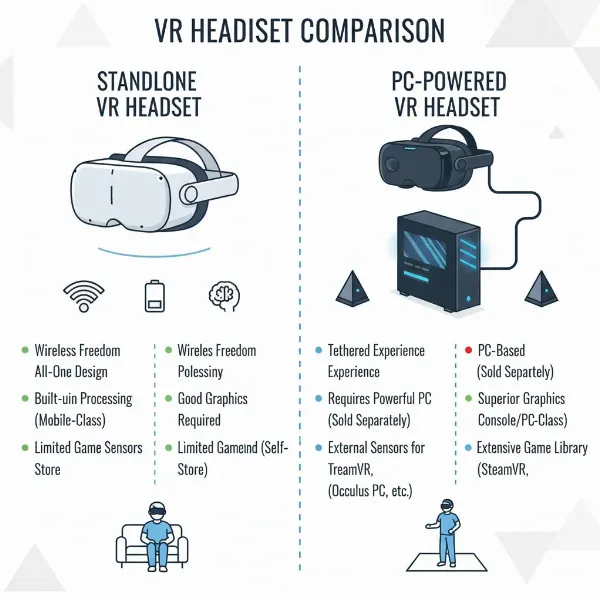 Comparison of standalone and PC VR headsets setup
Comparing Top VR Headsets
Choosing the ideal VR headset involves weighing various technical specifications against your personal preferences and budget. The market offers a range of devices, each excelling in different areas. Here’s a comparison of some leading VR headsets in 2024, highlighting their core features to help you discern which might be the best fit for your virtual adventures.
| Product | Resolution (per eye) | Refresh Rate | Field of View (FoV) | Price (Approx.) | Pros | Cons | Overall Rating |
|---|---|---|---|---|---|---|---|
| Meta Quest 3 | 2064 x 2208 | 72Hz, 90Hz, 120Hz | 110° horizontal | $500 | Excellent mixed reality, powerful standalone, wireless PCVR | Battery life for demanding games | 9/10 |
| Pimax Crystal | 2880 x 2880 | Up to 120Hz | 125° (diag) | $1600 | Industry-leading clarity, wide FoV, local dimming | High price, heavy, software can be finicky, PC-only | 8.5/10 |
| HTC Vive Pro 2 | 2448 x 2448 | 90Hz, 120Hz | 120° | $800 (headset only) | High resolution, wide FoV, precise tracking with base stations | Requires base stations (extra cost), wired PCVR only | 8/10 |
| Pico 4 | 2160 x 2160 | 72Hz, 90Hz | 105° | $400 | Lightweight, comfortable, good visuals for the price | Smaller content library than Meta Quest, not sold in US | 7.5/10 |
| Meta Quest 2 | 1832 x 1920 | 60Hz, 90Hz, 120Hz | 90° | $250 | Highly affordable, vast standalone library, good ecosystem | Lower resolution than newer models, less comfortable | 7/10 |
(Note: Prices are approximate and subject to change. “Overall Rating” is subjective and based on a balance of features, performance, and value.)
The Meta Quest 3 stands out as a versatile all-rounder, offering an excellent blend of standalone freedom and mixed reality capabilities, making it a top choice for many users. For those prioritizing visual fidelity above all else and possessing a high-end gaming PC, the Pimax Crystal offers an unparalleled level of clarity and expansive field of view. Meanwhile, the HTC Vive Pro 2 remains a strong contender for PC VR enthusiasts who demand precise tracking and high resolution, provided they are willing to invest in the full setup. The Pico 4 provides a comfortable and capable standalone experience at a competitive price point, and the Meta Quest 2 remains an accessible entry point into VR for budget-conscious buyers.
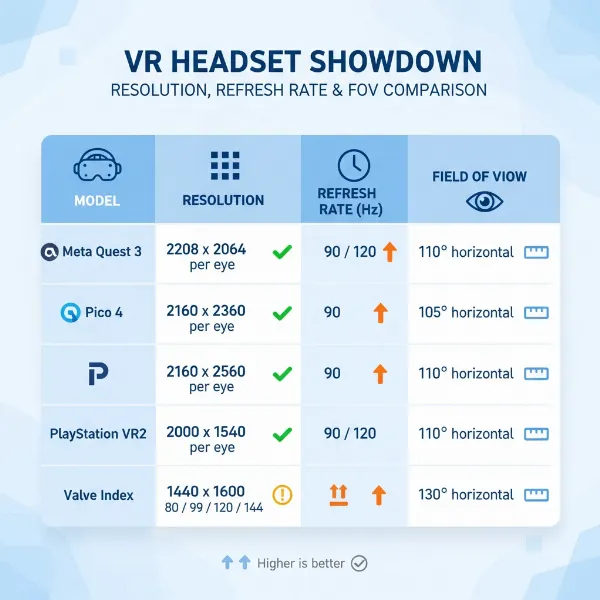 Detailed specifications table for comparing VR headsets
Key Factors When Choosing a VR Headset (Buying Guide)
Selecting the perfect VR headset involves a deep dive into several critical technical specifications and user-centric features. Understanding these elements will empower you to make an informed decision that ensures long-term satisfaction with your virtual reality experience.
Resolution and Refresh Rate
These two specifications are paramount for visual quality and comfort. Resolution, typically expressed as pixels per eye, determines the sharpness and detail of the virtual world. Higher resolution means less “screen door effect” (visible gaps between pixels) and clearer images. Aim for at least 1832×1920 pixels per eye for a good experience, with higher resolutions like 2K or 4K per eye offering superior clarity. Pixels Per Degree (PPD) is another crucial metric, indicating pixel density relative to your field of view, providing a more accurate measure of perceived sharpness.
Refresh rate, measured in Hertz (Hz), indicates how many times the screen updates per second. A higher refresh rate (90Hz or above is ideal) results in smoother motion, reduces motion blur, and is crucial for preventing motion sickness, especially in fast-paced games or experiences. A low refresh rate can lead to a choppy, uncomfortable experience.
Field of View (FoV)
The Field of View measures the extent of the observable virtual environment at any one time, usually expressed in degrees. A wider FoV makes the virtual world feel more expansive and immersive, reducing the feeling of “looking through binoculars.” Most quality VR headsets offer an FoV between 100° and 110°, which is a good balance for most users. Some high-end headsets push this to 120° or even higher for a truly peripheral-filling experience.
Tracking (Positional Tracking)
Tracking systems determine how your headset and controllers are mapped in 3D space, enabling your movements in the real world to translate into the virtual one.
- Inside-out tracking uses cameras on the headset itself to scan the environment and track your position and controller movements. It’s highly portable and easy to set up, as no external sensors are required. Devices like the Meta Quest series use this method. However, it can sometimes struggle in low-light environments or if your controllers move outside the camera’s view.
- Outside-in tracking relies on external base stations or sensors placed around your play area. These systems often offer higher precision and lower latency, making them ideal for professional applications and hardcore sim gaming. Examples include the HTC Vive and Valve Index. The main downsides are the more complex setup and reduced portability due to the need for external hardware.
- Most modern VR headsets offer 6 Degrees of Freedom (6DoF) tracking, meaning they track movement along X, Y, Z axes (left-right, up-down, forward-back) and rotation (pitch, yaw, roll). This is essential for truly immersive room-scale VR. Older, simpler headsets might only offer 3 Degrees of Freedom (3DoF), tracking only rotational movements.
Ergonomics and Comfort
Since VR experiences can last for extended periods, comfort is paramount. Consider the headset’s weight distribution, padding quality, and adjustability. Look for headsets with adjustable straps and comfortable facial interfaces. Interpupillary Distance (IPD) adjustment, which allows you to set the distance between the lenses to match the distance between your pupils, is also crucial for visual clarity and reducing eye strain. Both mechanical (physical slider) and software-based IPD adjustments are available, with mechanical being generally preferred for precision.
Platform and Content
Hardware is only as good as the software it runs. Research the available content library and platform ecosystem before purchasing. Standalone headsets typically have their own curated app stores (e.g., Meta Quest Store), while PC-powered headsets primarily rely on platforms like SteamVR, which boasts a vast selection of games and applications. Some premium experiences might be exclusive to certain platforms or headsets, so if you have a specific game or application in mind, ensure your chosen headset is compatible.
Price
VR headsets range significantly in price, from budget-friendly options to high-end professional-grade devices.
- Entry-level (under $300): Often older standalone models like the Meta Quest 2. Good for casual use and exploring basic VR.
- Mid-range ($300-$800): Current-gen standalone like Meta Quest 3 or more accessible PC VR options. Offers a great balance of performance and features.
- High-end ($800+): Premium PC-powered headsets like Pimax Crystal or HTC Vive Pro 2, delivering top-tier visual fidelity and tracking for enthusiasts and professionals.
Factor in the total cost of ownership, including any required PC upgrades or accessories.
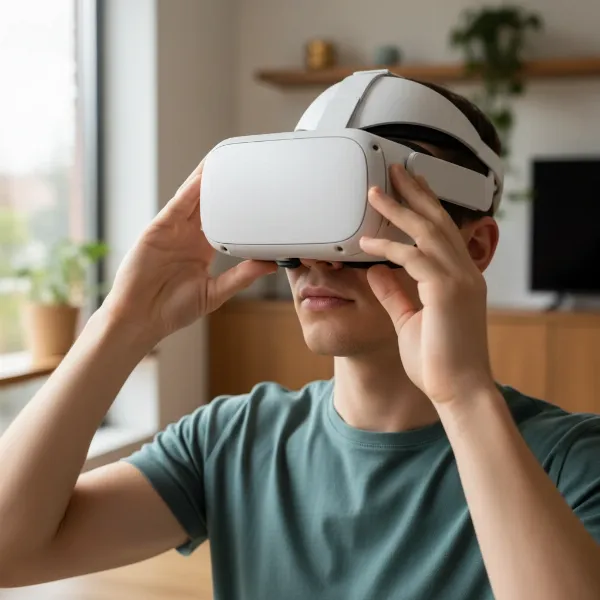 Person trying VR headset for comfort and fit
How to Use and Maintain VR Headsets
Proper usage and regular maintenance are essential to ensure your VR headset provides optimal performance and a long lifespan. Taking care of your device will preserve image clarity, maintain tracking accuracy, and prevent discomfort.
Installation and Setup
- Charge Fully: Before first use, fully charge standalone headsets and controllers.
- Clear Your Play Area: Ensure ample space free of obstructions to prevent accidents, especially for room-scale VR.
- Software Installation: Install any necessary software on your PC (for PC-powered headsets) or complete the initial setup steps on the headset itself (for standalone devices).
- IPD Adjustment: Adjust the Interpupillary Distance (IPD) to match your eyes for clear vision and comfort. Many headsets have a physical slider, while others use software.
- Strap Adjustment: Securely fasten the head straps, but not too tightly, to ensure the headset is stable and comfortable without causing pressure points.
Safe and Effective Use
- Take Breaks: VR can be intense. Take regular breaks (e.g., every 20-30 minutes) to prevent eye strain, fatigue, or motion sickness.
- Stay Aware of Surroundings: Even with passthrough cameras, remain aware of your physical environment and avoid bumping into objects.
- Hygiene: If sharing, use disposable covers or disinfectant wipes between users.
- Adjust for Comfort: If you feel any discomfort or blurry vision, re-adjust the straps and IPD.
- Glasses Spacers: If you wear glasses, always use any provided glasses spacers to prevent scratching the headset lenses.
Maintenance Tips
- Clean Lenses Carefully: Use a dry, non-abrasive microfiber cloth specifically designed for optics. Wipe gently from the center outwards in a circular motion. NEVER use liquid cleaners, alcohol, or abrasive materials, as they can damage lens coatings.
- Clean Facial Interface: Wipe the foam or silicone facial interface with a damp cloth or a non-abrasive, alcohol-free wipe. Allow it to air dry completely before use. Removable interfaces can often be hand-washed.
- Store Properly: Store your VR headset in a cool, dry place away from direct sunlight. Sunlight can permanently damage the lenses and screens. Many headsets come with covers or cases, which are ideal for protection.
- Cable Management: If using a wired PC VR headset, manage cables carefully to prevent tangles and damage. Consider ceiling pulley systems for a better experience.
- Battery Care: For standalone headsets, avoid fully draining the battery repeatedly to prolong its lifespan. Store at a moderate charge (e.g., 50%) if not using for extended periods.
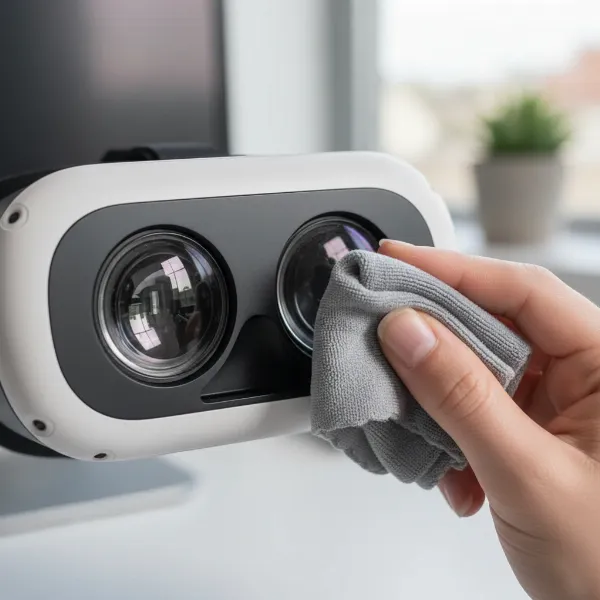 Hand cleaning VR headset lenses with microfiber cloth
Useful Accessories for VR Headsets
While a VR headset provides the core immersive experience, several accessories can significantly enhance comfort, audio, and interaction, elevating your virtual adventures to the next level. Investing in the right peripherals can address common pain points and unlock new possibilities.
Headphones
High-quality audio is just as crucial as visuals for immersion. Many VR headsets include built-in speakers or integrated headphones, but dedicated external headphones often provide superior sound.
- Over-ear headphones offer excellent sound isolation, immersing you more deeply by blocking out real-world distractions.
- In-ear monitors (IEMs) are lightweight and less bulky, offering a good balance of sound quality and portability.
Choosing headphones with a rich soundstage and clear bass can make a profound difference, especially in atmospheric games or cinematic VR experiences.
Controllers
Most VR headsets come with their own motion controllers, which are fundamental for interacting with virtual environments. However, some users seek alternatives or enhancements:
- Third-party grips and straps: Can improve comfort and security, especially during active gameplay.
- Hand tracking: Some modern headsets offer controller-free hand tracking, allowing you to use your bare hands for interaction. While still evolving, it’s excellent for casual experiences or creative applications.
- Full-body tracking: For advanced users, external trackers can be attached to your body (waist, feet) to translate full body movements into VR, ideal for social VR or simulation.
Cables and Chargers
- Link Cables: For standalone headsets that support PC VR (like the Meta Quest 3), a high-quality USB-C link cable is essential for a stable, low-latency wired PC VR experience. Ensure it’s long enough and supports sufficient data transfer speeds.
- External Battery Packs/Head Straps with Integrated Batteries: Standalone VR headsets often have limited battery life. An external battery pack or a head strap with a built-in battery can significantly extend playtime, particularly for demanding applications or long sessions.
- Charging Docks: Convenient charging docks can keep your headset and controllers neatly organized and charged, always ready for your next session.
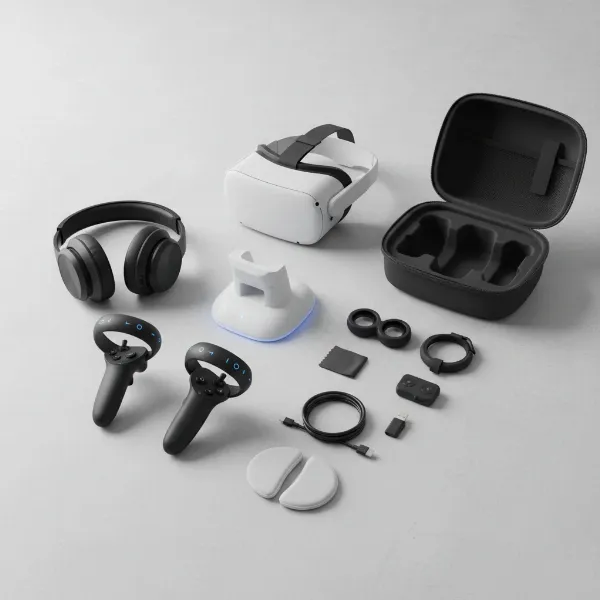
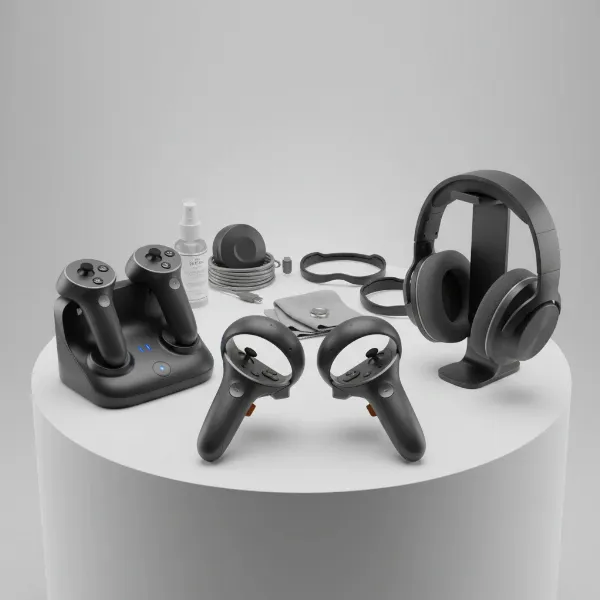 Display of various VR headset accessories like controllers and headphones
Conclusion
Choosing the right VR headset is a pivotal step towards unlocking unparalleled immersive experiences, whether for gaming, education, or professional applications. By carefully considering factors such as the type of headset (standalone vs. PC-powered), critical specifications like resolution, refresh rate, and field of view, and ensuring ergonomic comfort, you can make a decision that perfectly aligns with your needs. Remember to also weigh the importance of tracking technology, content availability, and overall budget to ensure a satisfying and error-free plunge into virtual worlds. As VR technology continues to advance, the right headset will serve as your gateway to limitless digital possibilities, transforming how you interact with content and environments. What virtual world will you explore first with your perfect VR headset?
Frequently Asked Questions
What resolution is recommended for a clear VR experience?
|
Our Picks for the Best VR headset in 2026
As an Amazon Associate I earn from qualifying purchases.
|
||
| Num | Product | Action |
|---|---|---|
| 1 | Meta Quest 3 512GB | VR Headset — Thirty Percent Sharper Resolution — 2X Graphical Processing Power — Virtual Reality Without Wires — Access to 40+ Games with a 3-Month Trial of Meta Horizon+ Included |

|
| 2 | HTC Vive XR Elite with Deluxe Pack — Mixed Reality and PC VR Headset + Controllers |
|
| 3 | Meta Quest 3S 128GB | VR Headset — Thirty-Three Percent More Memory — Virtual Reality Without Wires — Access to 40+ Games with a 3-Month Trial of Meta Horizon+ Included (Renewed Premium) |
|
| 4 | DESTEK V5 VR Headset for Kids & Phone w/Controller & 100+ Apps, Anti-Blue Light HD Lenses, 110° FOV, Compatible with iPhone & Android, Ideal for Family Entertainment & Gifting - Black |
|
| 5 | Meta Quest 3S 128GB | VR Headset — Thirty-Three Percent More Memory — 2X Graphical Processing Power — Virtual Reality Without Wires — Access to 40+ Games with a 3-Month Trial of Meta Horizon+ Included |
|
| 6 | HTC Vive Focus Vision — Mixed Reality and PC VR Headset + Controllers — Consumer Edition |
|
| 7 | TECKNET VR Headset for Phone with Bluetooth Controller, 4.7-7.2" VR Headsets with HD 110°FOV Anti-Blue Light Lenses & Adjustable Gears, 3D VR Headset for Kids Compatible iPhone Samsung Android |
|
| 8 | Meta Quest Pro Headset with Virtual Reality Field Trips 1-Month Subscription |
|
| 9 | Pimax Crystal Light VR Headset for PC, 2880x2880 per Eye, 8K QLED Display with Local-Dimming, Inside-Out Tracking, PC VR Headset for Flight Sims, iRacing & Gaming (Full Payment Version) |
|
| 10 | Meta Quest 2 128GB - Advanced All-in-One Virtual Reality Headset (Renewed) |
|
For a truly clear VR experience, a resolution of at least 1832 x 1920 pixels per eye is recommended to minimize the “screen door effect” and ensure sharp visuals. Higher resolutions, especially with a good Pixels Per Degree (PPD) rating, will offer even greater detail and immersion.
Is a high refresh rate important for VR headsets?
Yes, a high refresh rate (90Hz or above) is critically important for VR headsets. It ensures smoother motion, reduces motion blur, and significantly helps in preventing motion sickness, providing a more comfortable and fluid virtual reality experience.
What is the difference between inside-out and outside-in tracking?
Inside-out tracking uses cameras on the headset itself to track movement and controllers, offering portability and easy setup. Outside-in tracking relies on external sensors placed in your room, generally providing higher precision and accuracy but requiring more setup and being less portable.
How does Field of View (FoV) affect VR immersion?
Field of View (FoV) determines how much of the virtual world you can see at once. A wider FoV makes the experience more immersive and natural, as it fills more of your peripheral vision, reducing the sensation of looking through a narrow viewport.
Can I use a VR headset if I wear glasses?
Many VR headsets are designed to accommodate users wearing glasses. Look for models that include a glasses spacer or offer ample room for spectacles. However, lens inserts custom-made for your prescription can provide superior comfort and clarity.
What should I consider for VR headset comfort?
For comfort, consider the headset’s weight distribution, the quality of its padding, and its adjustability. Features like easily adjustable straps and a precise Interpupillary Distance (IPD) adjustment are crucial for long-term comfort and to avoid eye strain.
What kind of PC do I need for a PC-powered VR headset?
A PC-powered VR headset requires a powerful gaming PC with a dedicated graphics card, a robust CPU, and sufficient RAM. Check the minimum and recommended specifications provided by the headset manufacturer to ensure compatibility and optimal performance.