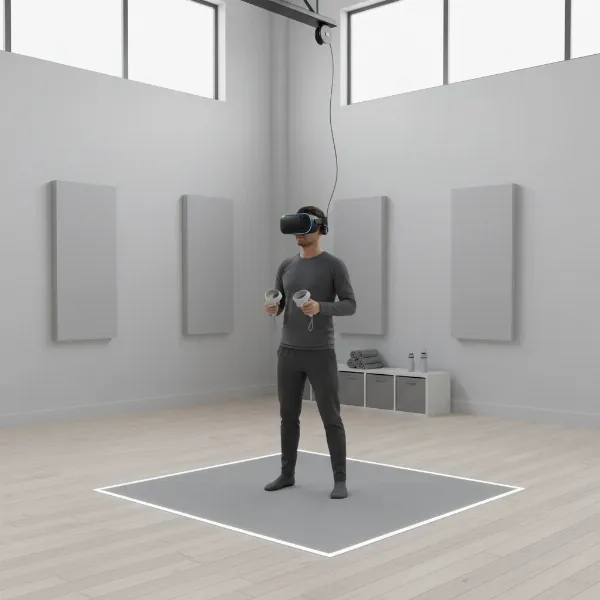
Stepping into virtual reality used to feel like a distant dream, reserved for sci-fi movies and high-end tech labs. Today, VR headsets are transforming from niche gadgets into accessible portals, offering breathtaking immersion for gaming, fitness, social interaction, and even productivity in our daily lives. With a plethora of options available, each promising a unique gateway to digital worlds, choosing the right VR headset for everyday use can feel daunting. This comprehensive guide cuts through the technical jargon, focusing on the practicalities of comfort, performance, and overall value, to help you discover the perfect headset for your routine.
VR Headsets: An Overview and Their Everyday Benefits
At its core, a VR headset is a device worn on the head that provides an immersive, stereoscopic view of a virtual environment, typically accompanied by audio and motion tracking to enhance the sense of presence. By displaying separate images to each eye, these headsets trick your brain into perceiving depth and space within a simulated world. Integrated sensors track your head movements, allowing you to look around naturally, while controllers often enable interaction with virtual objects.
The applications of VR headsets have expanded far beyond just gaming. For daily use, they offer enhanced entertainment, transporting you to cinematic experiences, virtual concerts, or interactive stories. In education, VR can provide immersive learning environments, from exploring historical sites to practicing complex medical procedures. Fitness enthusiasts are embracing VR workouts, turning mundane routines into engaging adventures. Social platforms in VR allow you to connect with friends and strangers in unique virtual spaces, fostering new forms of interaction. Even casual productivity benefits, with mixed-reality headsets enabling virtual monitors and collaborative workspaces overlaid onto your real environment. The true benefit lies in their ability to provide unique, engaging experiences that enhance various facets of your everyday life, making the extraordinary feel routine.
Popular VR Headset Categories Today
The VR landscape offers a variety of headsets, each designed with different capabilities and target users in mind. Understanding these categories is crucial for pinpointing the best fit for your daily needs.
Standalone VR Headsets
Standalone VR headsets are all-in-one devices that house all the necessary processing power, displays, and batteries directly within the headset. They operate independently, requiring no connection to a PC or console. This self-contained design prioritizes ease of use and portability, making them incredibly popular for everyday users.
- Pros: Exceptional portability allows you to use them anywhere with sufficient space. They are generally much easier to set up and use, often requiring just a quick charge and a few simple steps to get started. The wireless freedom eliminates tangled cables, enhancing immersion and safety. Often, they represent a lower initial investment as they don’t necessitate a powerful gaming PC.
- Cons: While increasingly powerful, their graphical capabilities are typically less advanced than PC-powered counterparts. Battery life can be a limitation for extended sessions. Upgrade options are usually restricted to software updates, as hardware components cannot be easily swapped out.
- Popular Models: The Meta Quest 3 and Meta Quest 3S are leading examples, offering a balanced blend of performance, accessibility, and a robust content library.
|
Our Picks for the Best VR headset in 2026
As an Amazon Associate I earn from qualifying purchases.
|
||
| Num | Product | Action |
|---|---|---|
| 1 | Meta Quest Pro Headset with Virtual Reality Field Trips 1-Month Subscription |

|
| 2 | Meta Quest 2 128GB - Advanced All-in-One Virtual Reality Headset (Renewed) |
|
| 3 | Meta Quest 3S 128GB | VR Headset — Thirty-Three Percent More Memory — 2X Graphical Processing Power — Virtual Reality Without Wires — Access to 40+ Games with a 3-Month Trial of Meta Horizon+ Included |
|
| 4 | HTC Vive XR Elite with Deluxe Pack — Mixed Reality and PC VR Headset + Controllers |
|
| 5 | DESTEK V5 VR Headset for Kids & Phone w/Controller & 100+ Apps, Anti-Blue Light HD Lenses, 110° FOV, Compatible with iPhone & Android, Ideal for Family Entertainment & Gifting - Black |
|
| 6 | Meta Quest 3S 128GB | VR Headset — Thirty-Three Percent More Memory — Virtual Reality Without Wires — Access to 40+ Games with a 3-Month Trial of Meta Horizon+ Included (Renewed Premium) |
|
| 7 | Meta Quest 3 512GB | VR Headset — Thirty Percent Sharper Resolution — 2X Graphical Processing Power — Virtual Reality Without Wires — Access to 40+ Games with a 3-Month Trial of Meta Horizon+ Included |
|
| 8 | Pimax Crystal Light VR Headset for PC, 2880x2880 per Eye, 8K QLED Display with Local-Dimming, Inside-Out Tracking, PC VR Headset for Flight Sims, iRacing & Gaming (Full Payment Version) |
|
| 9 | HTC Vive Focus Vision — Mixed Reality and PC VR Headset + Controllers — Consumer Edition |
|
| 10 | TECKNET VR Headset for Phone with Bluetooth Controller, 4.7-7.2" VR Headsets with HD 110°FOV Anti-Blue Light Lenses & Adjustable Gears, 3D VR Headset for Kids Compatible iPhone Samsung Android |
|
PC-Powered VR Headsets
These headsets rely on a powerful desktop computer to render virtual environments, connecting via cables to leverage the PC’s superior processing and graphical capabilities.
- Pros: They deliver the highest fidelity graphics and the most detailed virtual worlds, thanks to the PC’s powerful GPU. Access to vast content libraries like SteamVR provides a wider array of games and applications, including many demanding simulations. PC components can be upgraded over time, offering a degree of future-proofing.
- Cons: A powerful and often expensive gaming PC is a prerequisite, significantly increasing the overall cost. The setup process can be more complex, involving driver installations and external sensor calibration for some models. The physical cables can limit freedom of movement and potentially break immersion. These systems are inherently less portable.
- Popular Models: The Valve Index and HTC Vive Pro 2 are well-regarded options for high-end PC VR experiences, though specialized devices like the Bigscreen Beyond also cater to this segment.
Console-Based VR Headsets
These headsets are designed to integrate seamlessly with specific gaming consoles, offering optimized performance and exclusive content libraries.
- Pros: They provide a streamlined, high-quality VR experience optimized for console gaming, often with compelling exclusive titles. Setup is generally straightforward, leveraging the existing console ecosystem.
- Cons: Requires ownership of a specific console (e.g., PlayStation 5 for PS VR2). The content library is limited to the console’s ecosystem, which may be smaller than PC VR.
- Popular Models: The PlayStation VR2 is the primary example in this category, known for its stunning visuals and haptic feedback.
Mobile VR Headsets
Mobile VR headsets utilize a smartphone inserted into a viewer to create a virtual experience. This category has largely been phased out due to limitations in performance and dedicated standalone VR advancements. While once an affordable entry point, they are no longer recommended for a modern, immersive VR experience.
Comparing Top VR Headsets for Everyday Use
Choosing the ideal VR headset for daily immersion means weighing factors like resolution, refresh rate, field of view, and, crucially, overall comfort and ecosystem. The Meta Quest 3 stands out as a leading contender for general everyday use due to its balance of features and accessibility. The Meta Quest 3S offers an even more affordable entry point, while the PlayStation VR2 caters specifically to console gamers. For those seeking the absolute peak of visual fidelity, PC-powered options like the Valve Index deliver, albeit with a higher barrier to entry for daily, casual use.
| Product | Type | Resolution (per eye) | Refresh Rate | Field of View | Price | Pros (Everyday Focus) | Cons (Everyday Focus) | Overall |
|---|---|---|---|---|---|---|---|---|
| Meta Quest 3 | Standalone | 2064×2208 | Up to 120Hz | 110 degrees | $499 | Excellent all-rounder, mixed reality, great content library | Battery life can be short, comfort may require accessories | Best standalone for most users |
| Meta Quest 3S | Standalone | 1832×1920 | Up to 120Hz | ~110 degrees | $299 (approx.) | More affordable entry point, good value, updated processor | Lower resolution than Quest 3, uses older lenses | Best value standalone headset |
| PlayStation VR2 | Console-Powered | 2000×2040 | 90/120Hz | ~110 degrees | $549 (headset only) | Stunning visuals, haptic feedback, PS5 exclusives | Requires PS5 console, limited to PlayStation ecosystem | Best for PS5 gamers |
| Valve Index | PC-Powered | 1440×1600 | 80/90/120/144Hz | 130 degrees | $999 (full kit) | Highest fidelity, wide FoV, precise tracking, customizable | High cost, requires powerful PC, complex setup, tethered experience | Best for dedicated PC VR enthusiasts |
Key Factors When Choosing a VR Headset (Buying Guide)
Selecting the right VR headset involves more than just looking at the price tag. Several technical and ergonomic factors significantly impact your daily experience.
Resolution and Refresh Rate: These two specifications are paramount for visual clarity and a smooth, comfortable experience. Higher resolution (e.g., 2K per eye or more) reduces the “screen door effect,” making images sharper and text more legible. A higher refresh rate (90Hz or above is ideal) ensures fluid motion, which is crucial for preventing motion sickness and increasing immersion. For everyday use, especially if reading text or enjoying detailed environments, prioritize a good balance of both.
Field of View (FoV): The Field of View refers to how much of the virtual world you can see at once. A wider FoV makes the experience feel more natural and less like looking through binoculars, enhancing immersion. While precise numbers vary, a FoV around 100-110 degrees is common for standalone headsets, with some PC VR options offering even wider views.
Tracking: VR headsets use tracking systems to monitor your head and controller movements. “Inside-out” tracking, common in standalone headsets like the Meta Quest series, uses cameras on the headset itself to map your environment, offering convenience and freedom from external sensors. “Outside-in” tracking, often used by PC VR systems, typically involves external base stations that track the headset and controllers, which can offer greater precision but requires more complex setup. Hand tracking, allowing you to interact without controllers, is also becoming a valuable feature for intuitive use.
Ergonomics and Comfort: This is arguably one of the most critical, yet often overlooked, factors for everyday use. A headset should feel comfortable during extended sessions. Consider the weight distribution (a balanced design is better than front-heavy), the adjustability and material of the head straps, and the padding of the facial interface. Look for designs that accommodate glasses wearers or offer interchangeable facial interfaces for hygiene and custom fit. “A well-designed headset uses its strap system to distribute the weight across the strongest parts of your head: the cranium and the forehead. The goal is to pull the weight away from your face.”
Platform and Content Ecosystem: The headset is merely a portal; the software is the world you explore. Each VR platform (e.g., Meta Quest Store, SteamVR, PlayStation Store) boasts its own library of games, apps, and experiences. Research the content available for your chosen headset to ensure it aligns with your interests, whether you’re into gaming, fitness, social apps, or creative tools. Exclusive titles can also be a deciding factor.
Price and Value: Beyond the initial purchase price of the headset, consider the total cost of ownership. Does it require an expensive gaming PC? Will you need to invest in accessories like an enhanced head strap or an external battery pack for optimal comfort and longevity? Balancing features with your budget and anticipated usage is key to finding true value.
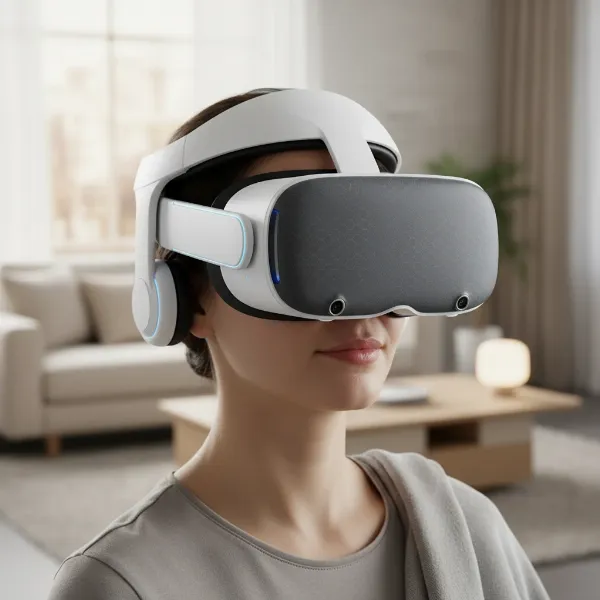 A person comfortably wearing a sleek VR headset, illustrating ergonomic design for extended use in a modern living room setting, soft ambient lighting
How to Use and Maintain Your VR Headset
To maximize your enjoyment and the lifespan of your VR headset for daily use, proper setup, safe usage, and diligent maintenance are essential.
Installation and Setup: For standalone headsets, initial setup usually involves charging, pairing controllers, and defining your “Guardian” or “Chaperone” boundary system. This virtual fence helps you stay within your physical play space, preventing collisions with furniture or walls. PC-powered headsets may require more steps, including installing PC software (like SteamVR), ensuring drivers are updated, and calibrating external sensors if applicable. Always follow the manufacturer’s specific instructions for a smooth first experience.
Safe and Effective Usage: Always ensure you have a clear, spacious play area free of obstacles before starting a VR session. Take regular breaks, especially when new to VR, to avoid eye strain or motion sickness. Start with shorter sessions (e.g., 15-30 minutes) and gradually increase duration as you get accustomed. Pay attention to your body’s signals and stop if you feel any discomfort. Ensure your headset is properly adjusted for a snug but comfortable fit to prevent blurriness or pressure points.
Maintenance Tips for Longevity:
- Cleaning Lenses: Use a dry, clean microfiber cloth specifically designed for optics. Wipe gently from the center outwards in a circular motion. Never use liquid cleaners, alcohol, or abrasive materials, as these can damage the delicate lenses.
- Cleaning Facial Interface: Many modern headsets have removable and washable facial interfaces. If yours doesn’t, use a gentle, alcohol-free wipe on non-absorbent materials or a slightly damp cloth on fabric. Ensure it’s completely dry before reattaching.
- Battery Care (for Standalone): For headsets with internal batteries, avoid constantly draining them to 0% or leaving them at 100% for extended periods. Store the headset at a moderate charge (e.g., 50-80%) if not using it for a while.
- Storage: Keep your headset in a cool, dry place away from direct sunlight, which can damage the lenses and screens. Many headsets come with protective covers or cases; use them to prevent dust and scratches.
Useful Accessories for VR Headsets
While many VR headsets offer a great out-of-the-box experience, certain accessories can significantly enhance comfort, extend playtime, and improve overall functionality for daily use.
- Enhanced Head Straps: The stock head straps on some headsets, particularly more budget-friendly standalone models, might not provide optimal comfort or weight distribution for long sessions. Upgrading to an “Elite Strap” or a halo-style strap can dramatically improve stability and reduce facial pressure, making the headset feel lighter and more balanced.
- External Battery Packs: For standalone headsets, battery life is often the main limitation. Attaching an external USB-C power bank can extend your playtime significantly, allowing for longer gaming, fitness, or social sessions without interruption. Some enhanced head straps even come with integrated battery packs.
- Prescription Lens Inserts: If you wear glasses, prescription lens inserts that clip into your headset are a game-changer. They protect your headset’s lenses from scratches and eliminate the discomfort of wearing glasses inside the headset, providing a clearer and more enjoyable visual experience.
- Controller Grips/Covers: Silicon grips or covers for your controllers can improve ergonomics, offer a better grip during active games, and protect them from sweat and accidental drops. Some even feature adjustable straps for added security.
- High-Quality Headphones/Earbuds: While many headsets have integrated audio, dedicated headphones or earbuds can offer superior sound quality and better immersion. This is particularly beneficial for games with intricate sound design or for a private, focused experience.
Conclusion
The world of VR headsets is more accessible and exciting than ever, offering a tangible path to daily immersion in virtual realms. From thrilling games and engaging fitness routines to collaborative workspaces and new social connections, these devices are quickly becoming an integral part of modern digital living. For most users seeking an all-encompassing, user-friendly experience, standalone headsets like the Meta Quest 3 and 3S offer an unparalleled blend of convenience, performance, and value. However, if uncompromised graphical fidelity and a vast PC gaming library are your priority, a PC-powered system like the Valve Index remains the gold standard, albeit with a higher investment. Remember that comfort, a rich content ecosystem, and ease of use are paramount for truly integrating a VR headset into your everyday routine. By carefully considering these factors, you can confidently choose a device that not only meets your needs but also ignites your sense of wonder.
Which virtual world will you explore first?
Frequently Asked Questions
Is VR safe for daily use?
Yes, VR can be safe for daily use with proper precautions. It’s crucial to take regular breaks, ensure your play space is clear, and adjust the headset for comfort to prevent eye strain or motion sickness. Modern VR systems often include safety features like guardian boundaries to help you stay aware of your physical surroundings.
Can VR headsets replace traditional monitors for work?
While VR headsets are not yet a complete replacement for traditional monitors for all professional tasks, mixed reality headsets like the Meta Quest 3 are making significant strides. They allow users to create virtual multi-monitor setups in their real-world environment, offering expansive screen real estate. This technology is continually evolving, promising more robust productivity tools in the future.
What is “motion sickness” in VR and how can I avoid it?
Motion sickness in VR, often called “simulator sickness,” occurs when there’s a disconnect between what your eyes see (motion in the virtual world) and what your inner ear senses (no physical motion). To mitigate it, start with short sessions, choose games with “teleport” locomotion options, ensure a high refresh rate, and take breaks if you feel discomfort. Ginger candies or anti-motion sickness remedies can also help some individuals.